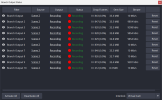
Branch Output - Streaming/Recording filter for source,scene

Branch Output - Streaming/Recording filter for source,scene 1.0.8

Hello, may I ask if the limitation that this plug-in can only support simultaneous recording of up to 8 channels in multi-channel recording is a restriction of the OBS software itself or of the plug-in? If there is a need for recording more channels, is there any way to resolve this issue? I am eagerly looking forward to your reply!!!
 
Last edited:
Hello, may I ask if the limitation that this plug-in can only support simultaneous recording of up to 8 channels in multi-channel recording is a restriction of the OBS software itself or of the plug-in? If there is a need for recording more channels, is there any way to resolve this issue? I am eagerly looking forward to your reply!!!
I'm not sure what you mean by "up to 8 channels in multi-channel recording"

The multi-track audio limit up to 6 tracks is a specification of OBS Studio output.
You cannot multiplex more than 6 tracks of audio.

Also audio channels can be up to 8 channels (7.1 audio)
 
I'm not sure what you mean by "up to 8 channels in multi-channel recording"

The multi-track audio limit up to 6 tracks is a specification of OBS Studio output.
You cannot multiplex more than 6 tracks of audio.

Also audio channels can be up to 8 channels (7.1 audio)
1757328120275.png

需要录制更多路的源
 
Can the number of multi-streams supported by each filter be expanded beyond 8?
The maximum number of streams/recordings varies depending on your PC's specifications.
For example, the number of hardware encoders available is limited by your GPU's specifications.

Furthermore, the maximum number of encoders that can operate stably is also limited by CPU load. (Watch task manager)

To determine why recording cannot start, check the logs in the OBS console. Also, if you are using a large number of hardware encoders, try switching some to software encoders (such as x264).

(The attached screenshot shows my case with up to 10 recordings at the same time.)
 

Attachments

  • スクリーンショット 2025-09-20 193922.png
    スクリーンショット 2025-09-20 193922.png
    84.1 KB · Views: 116
hanatyan updated Branch Output - Streaming/Recording filter for source,scene with a new update entry:

1.0.5 (Enhanced Recording, Improved Stability)

Changes​

  • Add: Added support for Fragmented MP4/MOV that was previously missing

  • Add: Enhanced recording functionality
    • Manual recording file splitting support (with hotkey support)
    • Recording pause and unpause (with hotkey support)
      • Can be paused if filter is recording only
    • Adding chapter markers to recording files (with hotkey support)
      • Only available in Hybrid MP4
  • Improve: UI...

Read the rest of this update entry...
 
Hi there! Thank you so much for adding fragmented mp4! I just did a test recording and it seems like fragmented mp4 is recording just like a normal mp4?

The attached image shows 2 files.
A normal OBS fragmented mp4 recording (1st file)
A fragmented mp4 recording from branch output (2nd file)

You can see on the right that the length of the file does not show on the 1st recording, which indicates that it is actually a fragmented mp4

I tried crashing obs and check if the file saved, but it did not recover, so fragmented mp4 records a normal mp4 file in branch output

1759136075196.png
 
Hi there! Thank you so much for adding fragmented mp4! I just did a test recording and it seems like fragmented mp4 is recording just like a normal mp4?

The attached image shows 2 files.
A normal OBS fragmented mp4 recording (1st file)
A fragmented mp4 recording from branch output (2nd file)

You can see on the right that the length of the file does not show on the 1st recording, which indicates that it is actually a fragmented mp4

I tried crashing obs and check if the file saved, but it did not recover, so fragmented mp4 records a normal mp4 file in branch output

View attachment 115787
We have confirmed the problem and plan to fix it in the next update.
 
hanatyan updated Branch Output - Streaming/Recording filter for source,scene with a new update entry:

1.0.6 (Hotfix of 1.0.5)

Changes​

  • Fix: On Mac/Linux, OBS Studio crashes when a stream disconnects or reconnects.
    • Note: Please upgrade your OBS 31 to 32 first.
      OBS 32 fixes crash on SRT reconnection but still has really freeze on stopping output after SRT reconnection failure.
      We still recommend to use OBS 30.2.3 for SRT transmitting purpose.
  • Fix: A bug where the stream could not be deactivated when it was perpetually stuck in a...

Read the rest of this update entry...
 
I have not been able to find the answer searching but it is probably just my brain not working. First I love this. It is exactly what I needed and has been working wonders for a few weeks. I have scenes for be right back, starting, etc. I use to be able to click on each and it would go to the different sources, using other plugins, but I am not able to figure out if there is a way to do this. As an example, I have a branch output for YouTube. It goes to the YouTube scene. If I click on beginning scene it would be great if YouTube and the main stream set in OBS would both change to beginning scene. then when I go back to the main scene I have YouTube would go back to the YouTube scene that branch output has specified. Not sure if I am making any sense. For me this is the only piece missing so far but if it is not possible not the end of the world. I just wouldn't be able to use those graphics anymore.
 
Feature(s) request:

Hey there, this plugin is an absolute game changer for my team and our workflow and archiving, thank you so much for making something this stable and consistent. I have a couple of features requests:

1. I'm not sure if I'm missing this, but is it possible to output straight to an audio-only file combining multiple sources that are selectable? For example we produce shows that later become podcasts and for workflow issues it would be great if we could have an mp3 file ready to go in editing of just the people on the show and none of the other sounds that accompany the show to quickly edit together in Audition or chosen audio software.

2. Automatic remuxing of source records. Right now we record to MKV for safeties sake but obviously those files are no good in editing software. Though I first asked about this a while back, I'm guessing the better solution to this is fragmented MP4 files? How are those in editing software? Is this is a better work around than remuxing?
 
Feature(s) request:

Hey there, this plugin is an absolute game changer for my team and our workflow and archiving, thank you so much for making something this stable and consistent. I have a couple of features requests:

1. I'm not sure if I'm missing this, but is it possible to output straight to an audio-only file combining multiple sources that are selectable? For example we produce shows that later become podcasts and for workflow issues it would be great if we could have an mp3 file ready to go in editing of just the people on the show and none of the other sounds that accompany the show to quickly edit together in Audition or chosen audio software.

2. Automatic remuxing of source records. Right now we record to MKV for safeties sake but obviously those files are no good in editing software. Though I first asked about this a while back, I'm guessing the better solution to this is fragmented MP4 files? How are those in editing software? Is this is a better work around than remuxing?
> I'm not sure if I'm missing this, but is it possible to output straight to an audio-only file combining multiple sources that are selectable?

OBS (and its lib) has no audio only recording/streaming output I believe.
It seems audo + blank video is only solution at this time.

I'll add them to the stockpile of ideas for new features.
 
hanatyan updated Branch Output - Streaming/Recording filter for source,scene with a new update entry:

1.0.8 (Replay Buffer, Filter Input mode, Blanking mode, etc...)

New Features​

  • Filter Input Mode (Experimental): Added the ability to capture and output video from the filter chain, with GPU usage optimization
  • Replay Buffer: Independent replay buffer is now available per filter
  • New Interlock Modes: Added "Replay Buffer" and "Always OFF" interlock modes
  • Blanking/Mute When Source Not Visible: Added a mode to blank video and mute audio when the source is not visible in the program output (by...

Read the rest of this update entry...
 
Back
Top